
It is possible to set a signing order when offering a transaction. This is possible, for example, when a manager first has to sign before the customer is sent the document.
How to set a signing order. When you create a transaction, you must first add recipients. After you have specified more than one recipient, the option "Set signing order" becomes available.
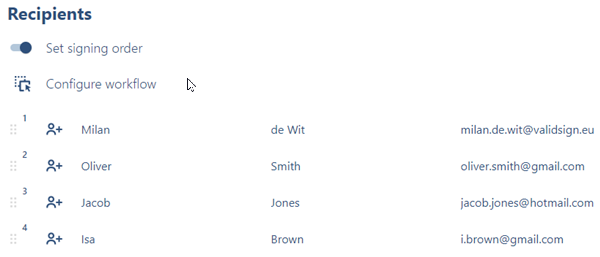
When you check the option "Set signing order" the signing order becomes visible. By default, the signing order continues per person. This means that only one person can sign at a time. As you can see above, Frans Bakker is the first to act. When he has signed, the signing goes to Herman de Vries. Then the signature ends up with Sophie de Graaf and this continues until the last person has signed.
It is also possible to set this signing order to your own liking. For example, you can indicate that two people have to sign first, and then the other three. You can configure everything yourself via the "Configure workflow" option. When you click this option you will see the following screen:
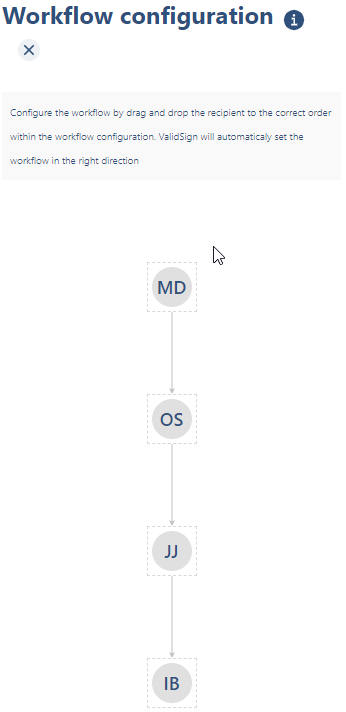
The signing order is still sequential. You can now move the icons with the initials of the signatories. You can drag them side by side, meaning the signers can sign at the same time, or you can choose to rearrange the order.
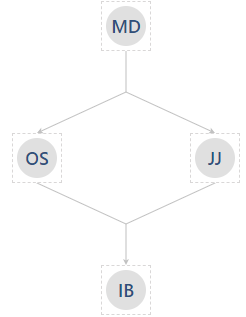
In the above configuration, it has been determined that Milan de Wit must sign first. For these two, it doesn't matter who signs first. When both gentlemen have signed, the signing goes to Isa Brown. When it is ready, the signing is complete.
Do you have questions about setting the signing order and/or document order?
Please contact us. This can be done via support@validsign.eu or 085 303 36 76.